Choose the story before the components
A miniature garden becomes easier to arrange when you can describe it in a sentence: a quiet mushroom clearing, a flower stall beside a stump, or a tiny vegetable patch. Pick the setting first, then give each component a role. The focal piece is where the eye should land. Supporting pieces explain the setting. Small accents connect those pieces without filling every gap. This approach helps you decide what to leave out when several attractive designs compete for the same space.
For a first layout, use a removable tray, shallow display box or another base you can test on the table. Trace its usable outline on paper and mark any rim, lid or handle that the finished decoration must clear. Keep the scene inside that boundary. A design that looks balanced on an open tabletop may feel crowded once it is inside its actual frame.
Shortlist real products by their role
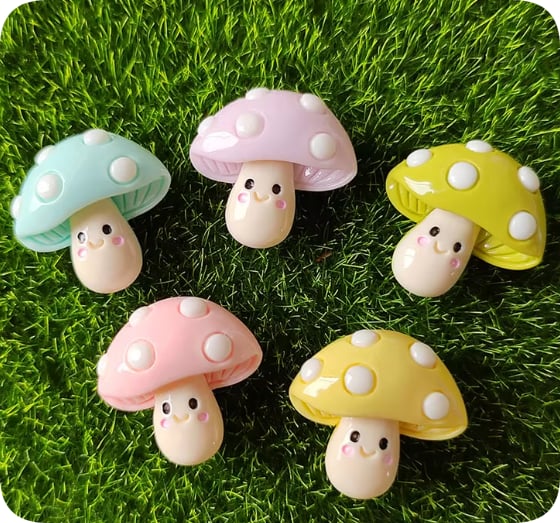
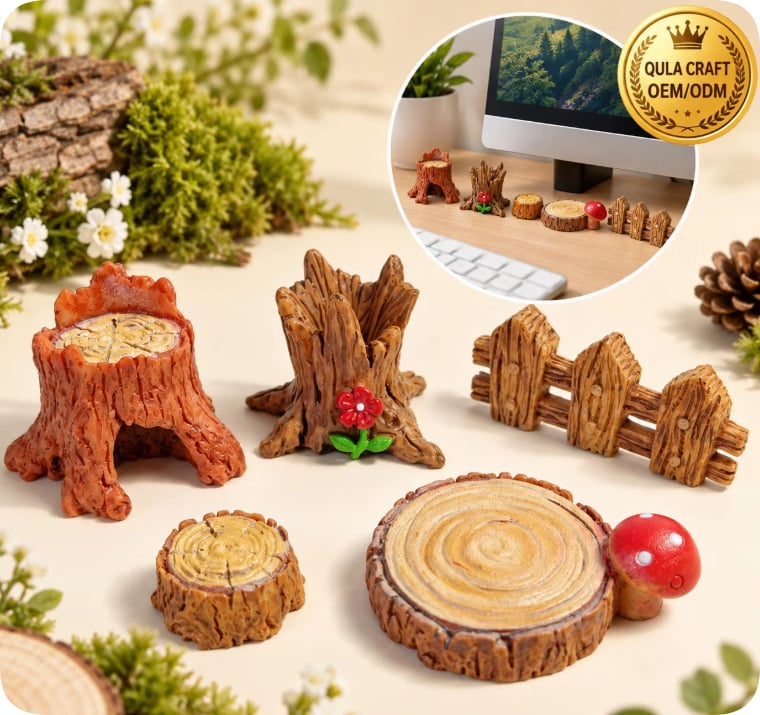
Try RW21765 pastel mushrooms as the focal group and RW26810 tree-stump miniatures as a contrasting woodland form. RW26817 miniature flower bouquets can suggest a garden corner or small flower stall. RW26811 green leaves offer another plant motif, but this listing includes holes: inspect the hole position and decide whether that detail belongs in your scene. These are design starting points from the catalog, rather than a packaged kit or a promise that every component will fit together.
If you prefer a vegetable-patch story, compare the pig and cabbage designs in RW20809 instead. Keep their shapes visible rather than burying them under other accents. Note the exact SKU beside each paper cutout or trial component so you can reproduce the arrangement later. Similar product names are easy to confuse when a project has several shades or mixed designs.
Check scale from measurements, then test the silhouette
Compare the stated dimensions on the individual product pages and request clarification for any dimension you need to make the layout work. Front photographs alone cannot establish height, depth, weight or the shape of the back. A mushroom can look small in a close-up and still dominate your chosen base. A tree stump may occupy more floor space than its front view suggests. Ask for a side or rear view when the attachment surface matters.
Cut paper shapes to the confirmed footprints, arrange them on the base and photograph the result from the intended viewing angle. Use the actual samples before final assembly, because paper cannot show how a rounded back sits or whether a tall piece hides another motif. Keep a visible route between the groups. Negative space gives the scene a readable structure and makes individual details easier to enjoy.
Build a palette around one existing component
Take a color that is already present in your focal piece and repeat it in one supporting area. A soft pink mushroom might pair with a quieter green accent and an off-white base. You can also choose a stronger contrast, provided the brightest detail remains where you want attention. There is no required color ratio; the useful test is whether the arrangement still reads clearly when viewed at its final size.
Adobe's color-wheel tool offers analogous, complementary and other harmony options. Use it to explore a palette, then return to the physical samples. A screen palette is a planning aid, not a specification for the resin colors you will receive. Photograph your dry fit under consistent light, and avoid choosing a new background simply because it matches an edited product photograph.
Palette planning reference: Adobe Color wheel.
Match the fixing method to the actual surfaces
Keep the first arrangement loose until you have checked how each component sits. A flatback, a dimensional ornament and a drilled leaf may need different attachment choices. Do not assume that every decorative piece can be threaded, glued upright or attached to a flexible base. Check the product description and ask about the back or hole when needed. If you use a removable display arrangement, test that pieces stay in place during normal handling.
For a bonded project, select an adhesive whose manufacturer lists both surfaces as suitable. Aleene's FAQ explains that the surfaces being joined affect glue choice and that dirt or grease can interfere with adhesion. Follow the instructions for your selected formula, including preparation, application, ventilation and curing. Make a small trial with the same base and a sample component before committing the whole scene. This guide does not establish adhesive compatibility for any SKU.
Surface-selection reference: Aleene’s manufacturer FAQ, Glues & Adhesives. Follow the instructions for your selected product.
Turn the successful dry fit into a repeatable project
Once you like the layout, record the base size, component codes, chosen variants and the number of pieces actually used. Take one overhead photograph and one image from the normal viewing direction. Mark where the focal piece sits relative to the base edge so a second version is easier to assemble. If you are preparing a workshop or a small collection, write down which details can vary and which ones define the design.
Keep the shopping list separate from the project recipe. A supplier's bag quantity is an ordering unit, while the number of pieces used in one scene is your own design choice. Ask about the available assortment before promising that every project will contain an identical mushroom or flower. Decorative components are non-edible craft materials. Choose an appropriate audience and storage arrangement, and keep food-like designs separate from food. For product selection or a mixed order, send the finished trial photo together with the exact SKU list.
Build your own component shortlist
Send your project image, selected product codes, quantities and packing preference so we can discuss the available options.